
Screenshots

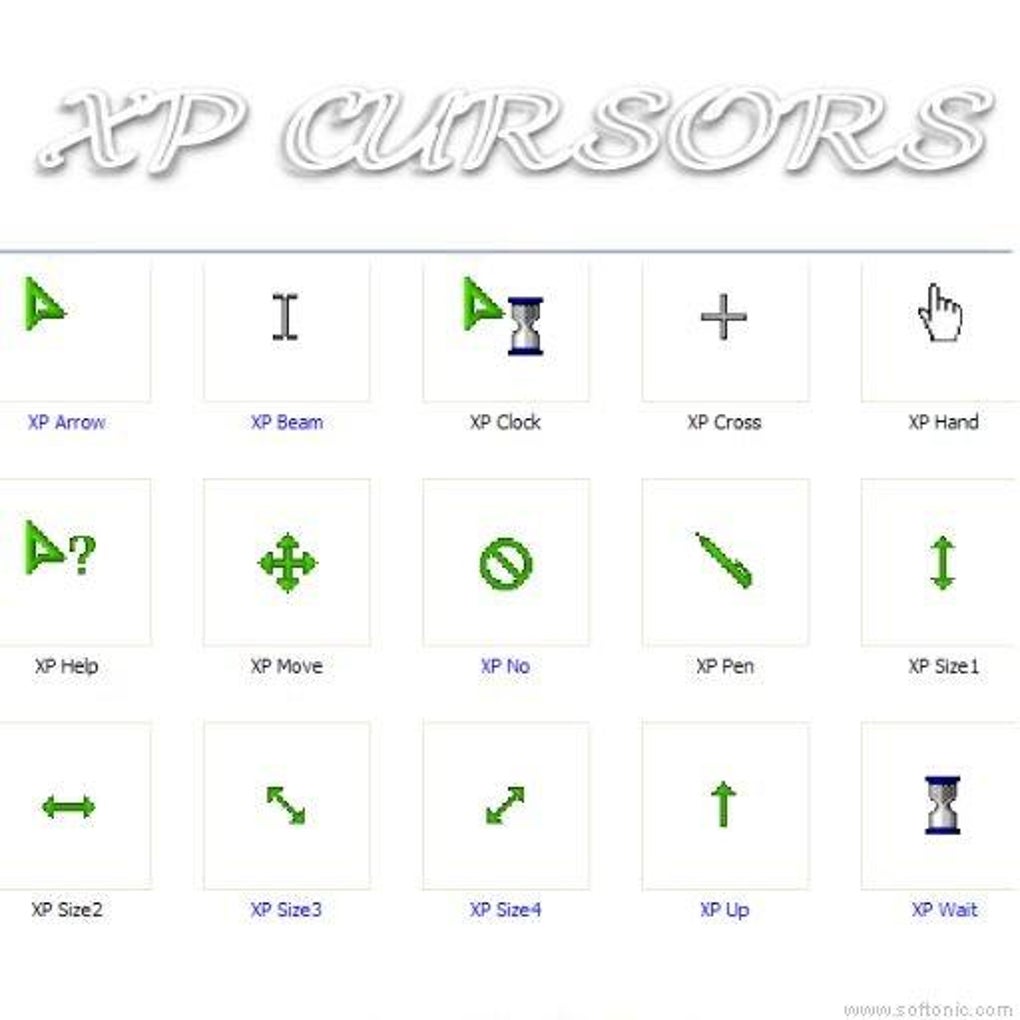
App details
- Version
- 1.2
- Size
- 71.64 KB
- Updated
- March 9, 2017
- Requires
- Windows 98
- Language
- English | Spanish
- License
- Free
- Developer
- More programs (243)
- Category
- Windows OS
SoftPas in:
This product is also available in the following languages:
About XP Cursors
Download XP Cursors – free Windows cursor customization tool
Overview
XP Cursors is a lightweight desktop‑customization utility that gives Windows users a quick way to replace the default pointer with a collection of futuristic, high‑resolution cursors. Developed by Mixage Software, the program is completely free and has been part of the software catalog since 2011. In its ten‑year history the application has amassed more than 160 000 downloads, with a steady user base in regions such as Indonesia, Pakistan, and Spanish‑speaking countries. The current version 1.2 was last updated on June 20 2011, but it still runs reliably on legacy systems ranging from Windows 95 up to Windows 10 (in compatibility mode). Because the installer is under 2 MB, it poses no risk of filling up hard‑drive space, making it an ideal choice for users who want a visual upgrade without sacrificing performance. XP Cursors supports multiple languages—including English and Spanish—so it can be comfortably used by a global audience. The software falls under the “Desktop customization” category with a subcategory of “Cursors,” and it is listed as a utility rather than a full‑blown suite. Its simplicity, combined with a polished set of cursor packs, makes it a favorite for gamers, designers, and anyone who spends long hours at the computer and wants a fresh look for their pointer. The program is distributed through a secure download link, and because it is free, there are no hidden fees or subscription requirements.
Key Features
- Over 30 futuristic cursor designs, each optimized for high‑DPI displays.
- One‑click installation of individual cursor sets or the full package.
- Compatibility mode for legacy Windows versions (Windows 95, 98, ME, 2000, XP).
- Multi‑language interface (English, Spanish) with easy language switch.
- Small footprint – installer under 2 MB, minimal RAM usage while running.
- Secure download from the official Mixage Software server with SHA‑256 verification.
- Automatic backup of the original Windows cursor scheme before any changes.
- Simple preview window that lets you test each cursor before applying it.
- Free updates (though the last official update was in 2011, the program still works on modern Windows).
- Standalone executable – no additional runtime libraries required.
Installation, Usage & Compatibility
Getting XP Cursors up and running is straightforward, even for users with limited technical experience. Follow these steps for a smooth installation:
- Visit the official Mixage Software download page and click the Download XP Cursors button. The file is a self‑extracting
.exearchive. - Once the download completes, double‑click the installer. Windows may display a security warning; choose “Run” to continue.
- The setup wizard will ask you to select a destination folder. The default location (
C:\Program Files\XP Cursors) works for most systems. - After the files extract, the program launches automatically. You’ll see a clean interface with a list of available cursor packs on the left.
- To apply a new cursor, simply select a pack and click the “Apply” button. XP Cursors will prompt you to confirm the change and will automatically back up the current Windows cursor scheme.
- If you wish to revert to the original pointers, open the “Backup” tab and click “Restore.”
Because the software targets Windows 95 and later, it uses the legacy win.ini and system.ini methods for older versions, while on newer Windows it interacts with the modern Control Panel\Mouse\Pointers registry keys. This dual‑approach guarantees that the cursors work on both classic and contemporary systems. The program is officially listed as compatible with the following operating systems (itemprop="operatingSystem"):
- Windows 95, 98, ME
- Windows 2000, XP, Vista
- Windows 7 (run in compatibility mode)
- Windows 8/8.1 (run in compatibility mode)
- Windows 10 (run in compatibility mode)
While the software does not have a native 64‑bit installer, it works perfectly on 64‑bit Windows because it only modifies user‑level cursor settings. No administrative privileges are required unless you want to install the cursors for all users on the machine. After installation, the program can be launched from the Start menu or by double‑clicking the desktop shortcut created during setup. The user interface is intentionally minimalistic: a left‑hand navigation pane for cursor packs, a central preview area, and a right‑hand pane for actions (Apply, Restore, Exit). This design keeps the learning curve shallow and lets you focus on visual customization rather than fiddling with technical settings.
Pros, Cons & Frequently Asked Questions
Pros
- Completely free – no hidden fees or ads.
- Very small installer size; does not bloat the system.
- Supports a wide range of Windows versions, including legacy systems.
- Instant preview lets you see each cursor before committing.
- Secure download with checksum verification.
Cons
- Last official update was in 2011; no recent feature additions.
- No native 64‑bit executable; must run in compatibility mode on newer Windows.
- Lacks advanced customization (e.g., per‑application cursor schemes).
- Only English and Spanish language options available.
- Limited support resources – community forums only.
FAQ
Is XP Cursors safe to download?
Yes. The program is hosted on the official Mixage Software website and includes a SHA‑256 checksum that you can verify before installation.
Can I use XP Cursors on Windows 10?
Absolutely. Although the software was designed for older Windows versions, it runs in compatibility mode on Windows 10 and changes the pointer settings without issues.
Do I need admin rights to install the cursors?
No. Installation and cursor changes are applied per‑user, so standard user accounts can install and use XP Cursors without administrator privileges.
Will the program affect system performance?
Not at all. XP Cursors uses less than 10 MB of RAM while running and does not run background services after the cursor change is applied.
Can I revert to the default Windows cursor?
Yes. The application automatically backs up the original cursor scheme and provides a “Restore” button to revert at any time.
XP Cursors delivers exactly what it promises – a fast, free way to give Windows a fresh visual feel. While the lack of recent updates might concern power users, the program’s stability on both legacy and modern systems makes it a solid choice for anyone looking to personalize their desktop without extra bloat.
Conclusion & Call to Action
In a world where many desktop‑customization tools charge a premium or come bundled with unwanted extras, XP Cursors stands out as a no‑cost, secure, and lightweight solution for Windows users who want a visual upgrade. Its extensive list of futuristic cursor packs, straightforward installation process, and broad compatibility across Windows generations make it a dependable choice for both casual users and power users alike. Although the software hasn’t seen an update since 2011, its core functionality remains solid, and the built‑in backup feature ensures you can always return to the default pointer scheme if desired. If you’re ready to give your desktop a fresh, modern look without spending a dime, click the download button below and start customizing today.
Download XP Cursors now – enjoy a free, secure, and hassle‑free cursor makeover.
Guides & Tutorials
How to install XP Cursors
- Click the Download button above.
- Once redirected, accept the terms and click Install.
- Wait for the XP Cursors download to finish on your device.
How to use XP Cursors
This software is primarily used for its core features described above. Open the app after installation to explore its capabilities.
User Reviews
No reviews yet. Be the first to share your experience.
You may also like
more
Llama 2
Free-to-use large language model As the new addition to Meta’s arsenal of langua...

NotebookLM
Revolutionizing the note-taking and idea-generation process NotebookLM is an exp...

Github co pilot
AI-inspired software development and coding platform GitHub Copilot is a browser...

Google Gemma
Google’s lightweight AI models Introducing Google Gemma , a family of cutting-ed...

AI Image Enlarger
A free app for Windows, by ai-image-larger. AI Image Enlarger is a free software...

DALL E
AI-driven text-to-image transformation engine DALL·E is a free graphic and desig...